

Publication Language
Meridian ships in 14 languages. Set your publication language in Ghost Admin and the theme's interface adapts automatically — no code or manual translation needed.
Starting with v1.2.0, Meridian ships with translations for 14 languages (Turkish joined in v1.10.0). When you set the publication language in Ghost Admin, the theme automatically displays all of its interface text — bylines, navigation, pagination, archive headings, membership prompts, share controls, reading time, and more — in that language.
No code changes or manual translation work is needed.
How to set the publication language
Log in to Ghost Admin and go to Settings.
Select General from the left sidebar.
Scroll down to find the Publication language field.
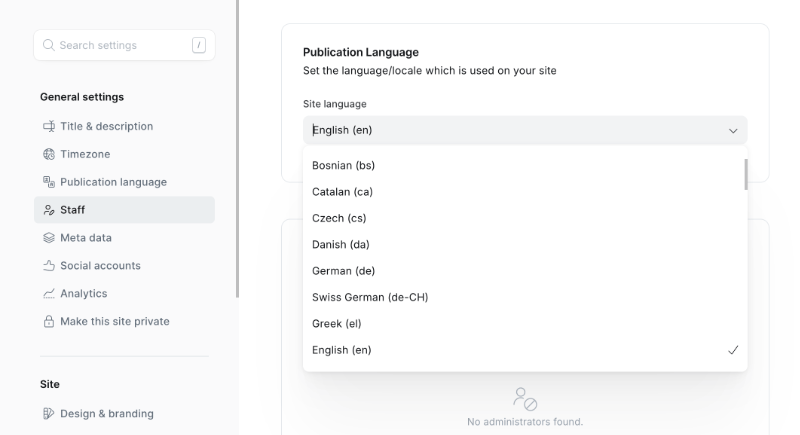
Enter the BCP 47 locale code for your language (for example, fr for French, de for German, pt-BR for Brazilian Portuguese). See the supported languages table below for all available codes.
Click Save — the theme will immediately reflect the new language across your site.
No theme reinstall required
Changing the publication language is a Ghost Admin setting. You do not need to re-upload or modify the theme files.
What gets translated
When a supported language is set, Meridian translates all of its own interface text, including:
- Masthead & navigation — search field, menu open/close labels, section browsing, skip-to-content
- Story cards & feeds — the "By" byline prefix, reading time, the "Breaking" and member-visibility badges (Free members, Paid, Subscribers only), "More in …" section links
- Archives & pagination — desk filters, "Page X of Y", "Showing X–Y of Z stories", section and reporter archive headings, and their empty states
- Post page — byline, "More from …" an author, related coverage, post navigation (previous / next), report-an-issue
- Membership & paywall — the upgrade prompts on gated stories, the membership CTA pricing panel, subscribe form labels and states
- Sharing — share menu, copy link, copy citation, and the per-network share labels
- Saved articles — the bookmarks page, save / remove labels, and its empty state
- Reader controls — the text-size and appearance popover labels
- Comments — comment count and call-to-action
- Error pages — 404 and generic error messages
- Print — the printed article's cover page and footer colophon
What is not translated automatically
The theme translates its own interface strings only. The following remain in whatever language they were written:
- Your post and page content
- Custom navigation labels you set in Ghost Admin → Navigation
- Custom text fields configured in Design & branding → Customize — for Meridian, the Member CTA headline and Member CTA body
To translate these, update them directly in Ghost Admin to match your chosen language.
Supported languages
Meridian includes translation files for the following 14 languages:
| Language | Locale code |
|---|---|
| Danish | da |
| Dutch | nl |
| English | en |
| French | fr |
| French (Canada) | fr-CA |
| German | de |
| Italian | it |
| Norwegian Bokmål | nb |
| Polish | pl |
| Portuguese | pt |
| Portuguese (Brazil) | pt-BR |
| Spanish | es |
| Swedish | sv |
| Turkish | tr |
Language not listed?
If your language is not in the table above, the theme falls back to English for its interface text. The rest of your site — your content, navigation labels, and custom text — will still display correctly.
If you'd like us to add support for your language, contact us and we'll be happy to help.
Ads
Fill Meridian's six ad slots plus the homepage in-feed from Ghost pages — image banners or AdSense code. Off by default and hidden from paid members.
Printing
Meridian ships a print-editorial layout — a cover masthead, running headers, and a source colophon — reachable from the article action toolbar.