

Homepage sections
Build Meridian's homepage section rows from Ghost pages — one recipe page per row, a
Below the Editor's Picks strip on the homepage, Meridian renders a band of section rows — visual blocks each shaped like a different newspaper section. Each row is driven by a Ghost page, not by tagging individual posts. The page acts as a "row recipe": its layout comes from a #home-* internal tag, its section name comes from its primary public tag, and the posts that fill the row are pulled by matching that primary tag.
The model in one sentence
One Ghost page = one homepage section row. Its job is to compose the row — but if someone opens the page at its own URL, Meridian renders the live section there too (see Opening a recipe page directly).
How a row is composed
For every row you want on the homepage, you create one Ghost page (Pages → New page) and configure three things:
- A public tag — e.g.
Politics,Markets,Opinion. This becomes the row's heading and the target of theMore in {tag} →link (both the link's wording and its destination can be overridden: see Renaming or retargeting the "More in" link). It must be the page's primary tag (the first tag you add). - A
#home-*internal tag — picks the layout for the row. All nine layouts (plus the#home-adad row) are covered on the Section layouts page. - Page publish date — orders the rows on the homepage. Pages are listed newest-first, so the most recently-published recipe page sits at the top of the band. Up to 30 rows are rendered.
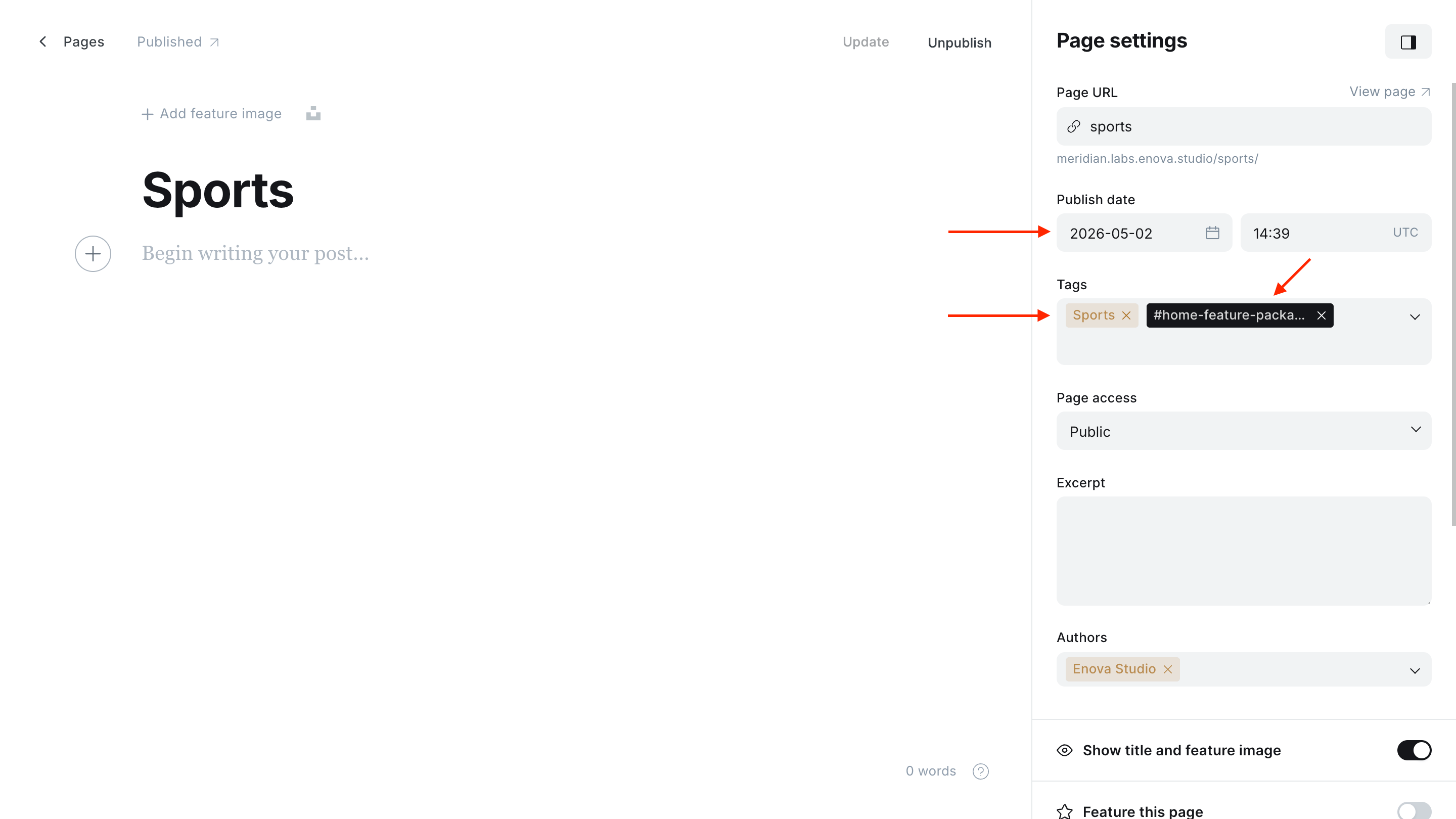
Once the page exists, every post that has the same primary tag automatically appears in the row, sorted newest-first. You don't tag individual posts with #home-* — only the recipe page does.
One #home-* tag per page
If a recipe page is tagged with two #home-* layouts, the first match in the precedence chain wins (the order on the layouts page). Stick to one layout tag per page.
How to add a section row
Create the recipe page
In Ghost Admin, go to Pages → New page. Title it after the section ("Politics", "Markets", "Opinion") — the title isn't displayed on the homepage but it's how you'll find the page later.
Add the public section tag first
In Page settings → Tags, add the public tag whose name should appear in the row header (e.g. Politics). The first tag you add becomes the primary tag — that's what drives the section's heading and the posts query for every layout except #home-tag-columns.
Add the layout tag
Add one of the nine #home-* internal tags (e.g. #home-asymmetric-lead-list). The leading # makes it internal — it won't appear in tag archives, but it will route the row to the right layout. Pick your layout on the Section layouts page.
Add the column tags
This step is only applicable for #home-tag-columns.
If you picked #home-tag-columns, add the public tags you want as columns in the order you want them shown. The primary tag becomes column 1; subsequent public tags become subsequent columns.
Author the body / excerpt
This step is optional and applicable only if you want to add a description to the section.
The page body is unused for every layout except #home-tag-columns, where the custom excerpt renders as a small eyebrow above the columns. You can leave the body empty.
Publish
Click Publish. The row will appear on the homepage at a position based on the page's publish date — newest pages sit at the top of the band.
Republish to reposition
Row order follows the page's published_at date, newest first. To bring an existing row to the top of the band, edit the recipe page and re-publish (or update the publish date).
Pick a layout
Every #home-* layout — what it looks like, how many posts it shows, and what kind of desk it suits — is documented with screenshots on its own page:
Renaming or retargeting the "More in" link
Every layout except #home-tag-columns and #home-ad ends its row header with a More in {tag} → link pointing at the primary tag's archive. Two optional fields on the recipe page override it. Both live in the editor sidebar under Meta data:
- Meta title replaces the link's wording. Whatever you type renders verbatim: "All politics coverage", "Read the full briefing", "Explore the archive".
- Canonical URL replaces the link's destination. An absolute URL or a site-relative path starting with
/both work, so the link can lead to a curated page, a different archive, or another site entirely.
Leave either field blank and that half falls back to the default: the translated More in {tag} text, and the tag archive URL.
These are SEO fields doing double duty
A recipe page is a real page with its own URL, and these two fields keep their normal SEO meaning there. Meta title also becomes the page's browser-tab and search-result title, and Canonical URL also tells search engines which page is the "real" version, whenever the recipe page is opened directly. In practice the two jobs agree: pointing Canonical URL at the link's destination consolidates ranking signals on the surface you want ranked (the same advice as Keeping recipe pages out of search results), and if you noindex your recipe pages the Meta title never reaches a results page. Just avoid link wording that would read badly as a browser-tab title.
No effect on #home-tag-columns
The tag-columns layout has no section-level "More in" link (each column header links to its own tag archive), so these two fields do nothing there.
Hiding a section row
A row only renders if the recipe page exists, is published, and has at least one post (or, for #home-tag-columns, at least one column with posts). To hide a row temporarily:
- Set the recipe page to draft in Page settings → Publish status. The row disappears until you re-publish.
- Delete the recipe page to remove the row permanently.
You don't have to touch the posts themselves — they stay published at their own URLs and in their tag archives; they're just no longer pinned to a homepage row.
Designing your section cadence
Each desk gets one recipe page. Pick the layout that fits the desk's editorial shape — a long briefing queue gets #home-briefing-carousel, a markets desk with one lead gets #home-asymmetric-lead-list, an opinion section gets #home-opinion-hedcut. You don't have to use all nine; pick the ones that match your sections.
A typical setup:
- Lead investigation / day's biggest story →
#home-feature-package(or#home-feature-railwhen the four supporting stories should read as equals) - Markets / Politics desk →
#home-asymmetric-lead-list - Opinion →
#home-opinion-hedcut - Briefing / digest →
#home-briefing(or#home-briefing-carouselfor a longer queue) - Section index row →
#home-tag-columnson a page with the section tags attached - General news, features, everything else →
#home-standard-3-column-grid(or#home-standard-4-column-gridfor a high-volume desk, four across on large screens) - An ad between sections →
#home-ad(see Ads for the creative workflow)
Up to 30 recipe pages are rendered on the homepage. Past that, the oldest pages stop appearing — keep the band trimmed to the rows you actually want above the archive tail.