

Persistent video player
Keep a started video playing in a mini-player as readers move between pages — how it works, the settings, members-only videos, accessibility, and analytics.
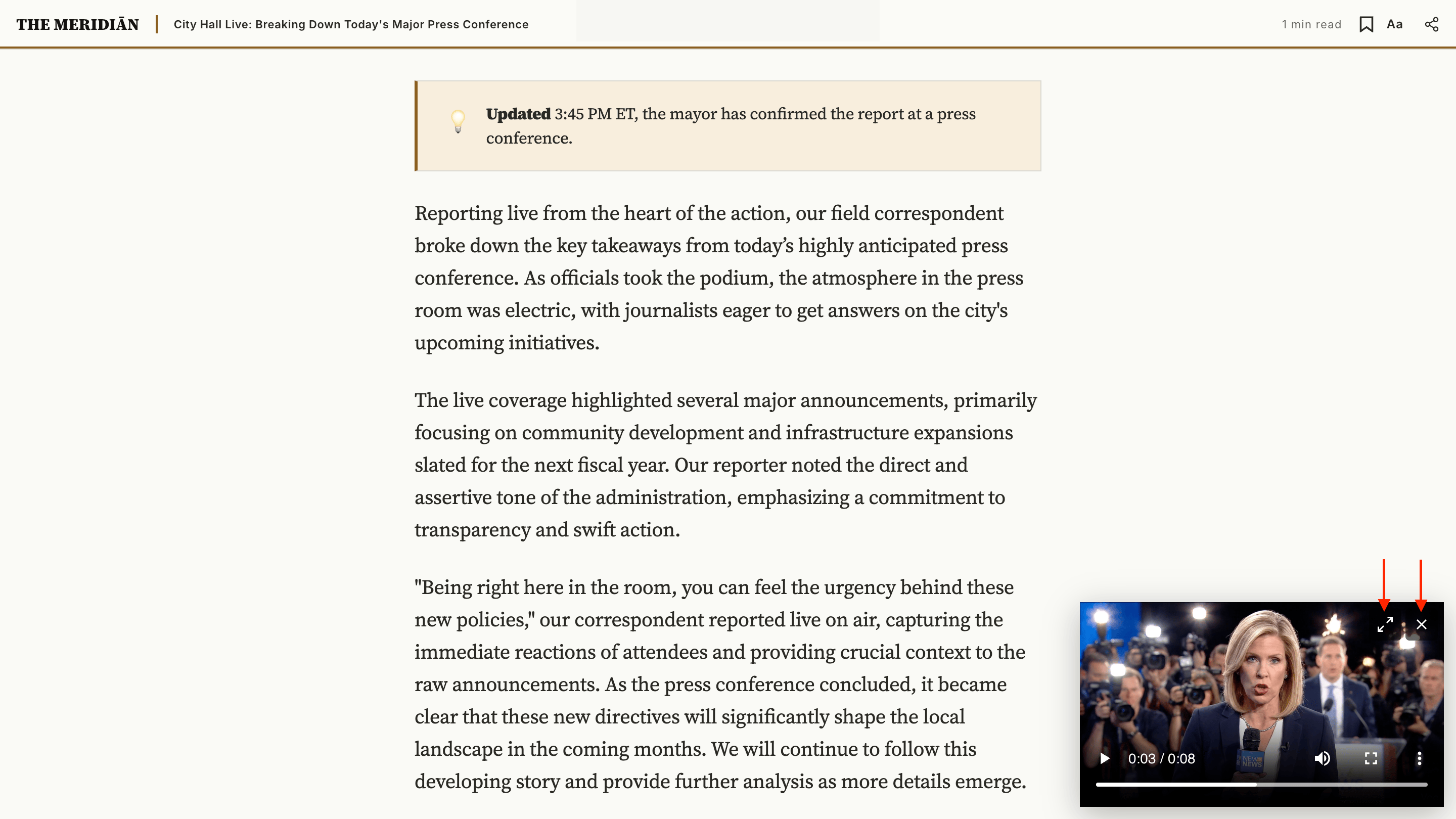
When a reader plays a video on a #video post and then clicks a link, Meridian keeps the video playing in a small mini-player while the next page loads around it — like the YouTube mini-player. They never lose their place, and the video doesn't restart.
It's the same uploaded video, YouTube, or Vimeo embed that plays in the article hero — it simply follows the reader across your site.
It only kicks in once a video is playing
Until a reader presses play, your site behaves exactly as it always has — every link is an ordinary page load. The moment a video is playing, navigation turns seamless so the video can continue; closing the mini-player returns to ordinary navigation. Readers who never play a video — and search engines — see no difference at all.
What the reader experiences
- They open a
#videopost and press play. The video plays in the article. - They scroll past it, or click a link to another page. The video shrinks into a mini-player in the corner and keeps playing — from exactly where it was, with no restart.
- From the mini-player they can:
- Jump back to the article (the expand button) — returns to the original post with the video back in its place.
- Close it (the × button, or press Escape) — playback stops and ordinary navigation resumes.
- Returning to the original post puts the video back in the hero, right where they left it.
Turning it on or off
The persistent player is controlled by the Enable persistent player setting — on by default. Turn it off to use Meridian's classic per-page player, where the video stops when the reader leaves the post. You can also choose which corner the mini-player rests in with Mini player position.
Both live under Settings → Design & branding → Customize → Theme → Post. See Post settings. (Before 1.11 they sat under Site wide; your saved values carried over.)
Supported videos
The persistent player works with the same sources as the #video hero — uploaded Ghost videos, YouTube, and Vimeo — and all three keep playing across pages without restarting. Other providers (Twitch, Wistia, Loom, …) keep their ordinary in-article embed and don't follow the reader.
Members-only videos
If a post is members-only or paid, its video is part of the gated content. A reader who can't access the post never receives the video at all — there's nothing to play or carry across pages, so a paywalled video can never leak. Once they sign in or subscribe, it behaves like any other video.
Accessibility
- The mini-player can be closed from the keyboard — press Escape — without moving your place on the page.
- Its buttons are full-size, keyboard-reachable targets.
- On each page change, the new page's title is announced to screen readers and keyboard focus moves to the new headline.
- Visitors with reduced motion enabled get no animation.
Search engines & no-JavaScript
Because the seamless navigation only begins after a reader presses play, search-engine crawlers and visitors without JavaScript always get plain, fully-rendered pages with ordinary links — exactly as before. Video posts still show their poster and play the in-article video for these visitors.
Analytics
While a video is playing, moving between pages happens without a full page reload — so your analytics tool needs to be told about each page change.
Ghost's built-in analytics counts these page views automatically. No setup needed.
If you use another analytics tool, add a small snippet under Settings → Code injection → Site footer. Meridian fires a meridian:pageview event on every in-page navigation, carrying the new page's path and title — point your tool at it.
Google Analytics 4:
<script>
  document.addEventListener('meridian:pageview', function (e) {
    if (typeof gtag === 'function') {
      gtag('event', 'page_view', { page_path: e.detail.path, page_title: e.detail.title });
    }
  });
</script>
Plausible:
<script>
  document.addEventListener('meridian:pageview', function () {
    if (window.plausible) window.plausible('pageview');
  });
</script>
Fathom (window.fathom.trackPageview()) and Matomo (_paq.push(['setCustomUrl', location.href]); _paq.push(['trackPageView'])) follow the same pattern — wrap the call in a meridian:pageview listener.
For developers: force a full reload on a link
Occasionally a specific link should always do a full page load — for example a page that relies on a script which only runs on a fresh load. Add data-mp-reload to that link and Meridian never intercepts it:
<a href="/special-page/" data-mp-reload>Special page</a>The player also falls back to a full page load on its own when it can't safely swap a page in — for instance a post with its own code injected into the site header.
Archive intro
Customize the header on Meridian's paginated archive pages (/page/2/ onward) from a Ghost page with slug archive-intro. Optional, with built-in fallback copy.
Bookmarks
Set up Meridian's saved-articles feature — Save buttons, a masthead popover, and a /bookmarks/ page — stored in the reader's browser, no API key needed.