

Publication Language
Enova ships 62 languages with full RTL support. Set your publication language in Ghost Admin and the theme translates itself.
Starting with v1.3.0, Enova ships with translations for 62 languages. When you set the publication language in Ghost Admin, the theme automatically displays all UI text — buttons, labels, navigation, pagination, newsletter prompts, reading time, and more — in that language.
No code changes or manual translation work is needed.
How to set the publication language
Log in to Ghost Admin and go to Settings.
Select General from the left sidebar.
Scroll down to find the Publication language field.
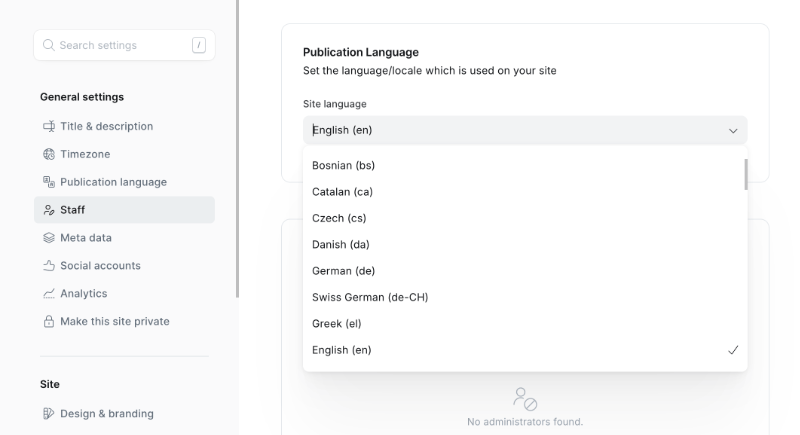
Enter the BCP 47 locale code for your language (for example, fr for French, ar for Arabic, de for German). See the supported languages table below for all available codes.
Click Save — the theme will immediately reflect the new language across your site.
No theme reinstall required
Changing the publication language is a Ghost Admin setting. You do not need to re-upload or modify the theme files.
What gets translated
The following UI elements are automatically translated when a supported language is set:
- Navigation — Search button label, sidebar toggle label
- Post feed — "Featured" badge, "Read more" links, reading time (e.g., "5 min read")
- Pagination — Previous / Next page labels
- Post page — Author byline prefix, post navigation labels, table of contents heading
- Social sharing — Share button and copy-link labels
- Newsletter & subscription — Subscribe button, CTA text, form placeholders
- Comments — Comment section heading and call-to-action
- Error page — 404 and generic error page messages
What is not translated automatically
The theme translates its own UI strings only. The following remain in whatever language they were written:
- Your post and page content
- Custom navigation labels you set in Ghost Admin → Navigation
- Custom text fields configured in Design & branding → Customize (e.g., subscribe text)
To translate these, update them directly in Ghost Admin to match your chosen language.
Right-to-left (RTL) support
When the publication language is set to any of the following, Enova automatically switches the entire layout to right-to-left direction:
| Language | Locale code |
|---|---|
| Arabic | ar |
| Hebrew | he |
| Persian (Farsi) | fa |
| Urdu | ur |
Region-qualified codes (such as fa-IR, ar-SA, or he-IL) and other right-to-left languages (Pashto ps, Kurdish ckb, Sindhi sd, Uyghur ug, Yiddish yi, Dhivehi dv) also switch the layout to RTL.
In RTL mode the theme mirrors the layout and all directional icons automatically — arrows, navigation chevrons, sidebar toggles, and the reading progress indicator — so your site looks and feels native for your audience without any extra configuration.
A few things deliberately keep left-to-right rendering in RTL mode, because that is how they are meant to read: code blocks and inline code, email address fields (aligned to the reading edge while you type), and the image lightbox's controls and swipe direction.
Use the plain two-letter code for translations
Ghost loads the translation file that matches your locale code exactly. Setting the language to fa loads the Persian translation, but fa-IR has no matching file, so theme strings fall back to English (the layout still flips to RTL). Unless you need a specific regional variant, set the plain code: fa, ar, he, or ur.
Supported languages
Enova includes translation files for the following 62 languages:
Language not listed?
If your language is not in the table above, the theme will fall back to English for UI strings. The rest of your site — your content, navigation labels, and custom text — will still display correctly.
If you'd like us to add support for your language, contact us and we'll be happy to help.
Donate / Reader Funding
Add a reader-funded support card to your home sidebar — author avatars, a checklist of what tips pay for, and donate buttons, all from a single Ghost page.
Custom Sidebar Widgets
Put a map, a chart, a booking form, or a countdown in the right sidebar. Build it once from a Ghost page, or give a single post its own.