

Right Sidebar
Every widget in Enova's right sidebar — About, Featured, Recent, Popular Tags, Top Authors, Newsletter, Recommendations, Related, TOC, ads, and Donate.
The Enova theme features an interactive right sidebar designed to keep your readers engaged and help them discover more of your content. From "About" sections to automatic "Related Posts," these widgets are built to work seamlessly with Ghost's native features.
The About Widget
The About widget is a perfect way to introduce your site to new visitors. It automatically displays your site icon, the About page's title, a brief description (the page's excerpt), and your social media links.
Visibility
This widget is only visible on the Home page. To hide it, open your About page in Ghost Admin, add the #hide-from-sidebar internal tag in Page settings → Tags, and update. Hiding the widget also hides any custom social links added through Code injection — they live inside it.
To get the most out of this widget, follow these simple steps:
Set your Publication Icon. Ensure you have an icon uploaded under Settings > Brand. View Publication Icon Guide →
Create a new page in Ghost with the specific slug about. The widget uses this page to pull your content and link directly to your full story.
Write a short summary in the Excerpt field of your "About" page settings. This text will appear directly in the sidebar widget.
Once you publish the page, the widget will automatically populate on your homepage.
About Widget Configuration

About Widget Preview

Social Media Links
The social icons in the About widget are pulled directly from your site settings:
Go to Settings > Social accounts.
Add your Facebook and X (formerly Twitter) links.
Click Save to update the icons in your sidebar.
Content Discovery Widgets
These widgets help your visitors find more of what they love, and they update automatically based on your latest activity.
Featured Posts
Highlights your top content by displaying the 4 most recent featured posts.
Featured Posts Preview

Recent Posts
Displays your 4 latest blog posts.
Note on Visibility
This widget is visible on Posts and Pages only. It does not appear on the homepage, tag pages, or author pages.
Recent Posts Preview

Popular Tags
Lists the 5 public tags associated with the most posts on your site. Internal tags (the ones whose name starts with #) never appear here.
Note on Visibility
This widget appears on all pages except for individual Posts and Pages.
Popular Tags Preview

Top Authors
Shows the top 4 authors on your site based on their post count.
Visibility
This widget is only visible on the Home page.
Top Authors Preview

Engagement & Navigation
Newsletter Subscription
Encourage visitors to join your mailing list with a simple, clean subscription form. This widget is globally visible on all pages.
Newsletter Widget Preview

Recommendations
Showcases the publications you recommend through Ghost's built-in recommendations feature, listing up to 5 recommended sites with a link to the full list.
Visibility
This widget is only visible on the Home page, and only when you've added recommendations in Ghost Admin → Settings → Recommendations. No recommendations, no widget.
Related Posts
Automatically suggests similar content to your readers — 3 posts that share the current post's primary tag (the first tag on the post). If a post has no primary tag, the widget simply doesn't appear for it.
Visibility
This widget appears only on Individual Posts. You can switch it off site-wide with the Show related posts setting.
Related Posts Preview

Previous & Next
On posts, a Post navigation card sits just above the table of contents with the previous and next article, each with its thumbnail. It is the same navigation as the band under the article, moved to where a reader can reach it without scrolling to the end.
It appears automatically, and it is smart about what it links to: a newsletter issue navigates to the issue before and after it, while a regular post skips newsletter issues entirely. On the newest or oldest post, only the one available direction shows.
To turn it off for a post, tag that post #disable-sidebar-post-nav. To turn off both surfaces at once, use #disable-post-nav.
Previous & Next
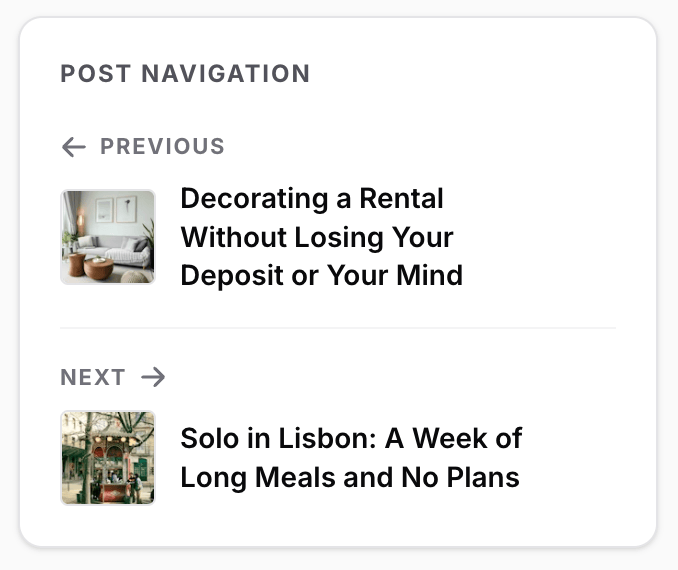
Table of Contents (ToC)
The Table of Contents has evolved into a full adaptive feature with both an Inline TOC and a Sidebar TOC widget. It now has its own dedicated guide.
View the Table of Contents guide →Monetization & Support
Enova can also run a promotional house ad, a sponsor logo wall, and a reader-funded Donate card in the right sidebar — each driven by a simple Ghost page, with its own dedicated guide.
House Ad
A promotional card just below the Newsletter widget, built from a page slugged house-ad. Stack an image, a product card, and a button — whatever you like.
Sponsors
A grid of supporter logos at the bottom of the sidebar, built from a page slugged sponsors. Each logo links to the sponsor's site, and you can tune the tile shape and number of columns.
Donate
A reader-funding pitch built from a page slugged donate — your message, optional author avatars, and buttons that link to Ko-fi, Stripe, Buy Me a Coffee, or anywhere else. It shows on the homepage automatically, and on any post or page you tag #display-donate-widget.
Anything else: custom widgets
When none of the cards above fit, build your own. Tag any published page #sidebar-widget and it becomes a sidebar card: a map, a chart, a booking form, a shop promo, whatever the page contains. A single post can also define a widget of its own from its Code injection, which is how you put this article's map next to this article.