

The archives
Your article archive at /articles/, and every tag and author page: posts filed under month headings, one line each, featured posts expanded in place, twelve posts a page, and where your RSS feeds live.
Quiet's archive is a reading index rather than a wall of cards: posts filed under the month they were published, one line each. The posts you mark Featured get a strip of picture cards at the very top, so a first-time reader sees your best work before the list begins. On a site with a few hundred essays that is the difference between a page you can scan and a page you scroll past.
Tag pages and author pages use the very same list, so a reader who has learnt to read one has learnt them all.
The archive - Editor
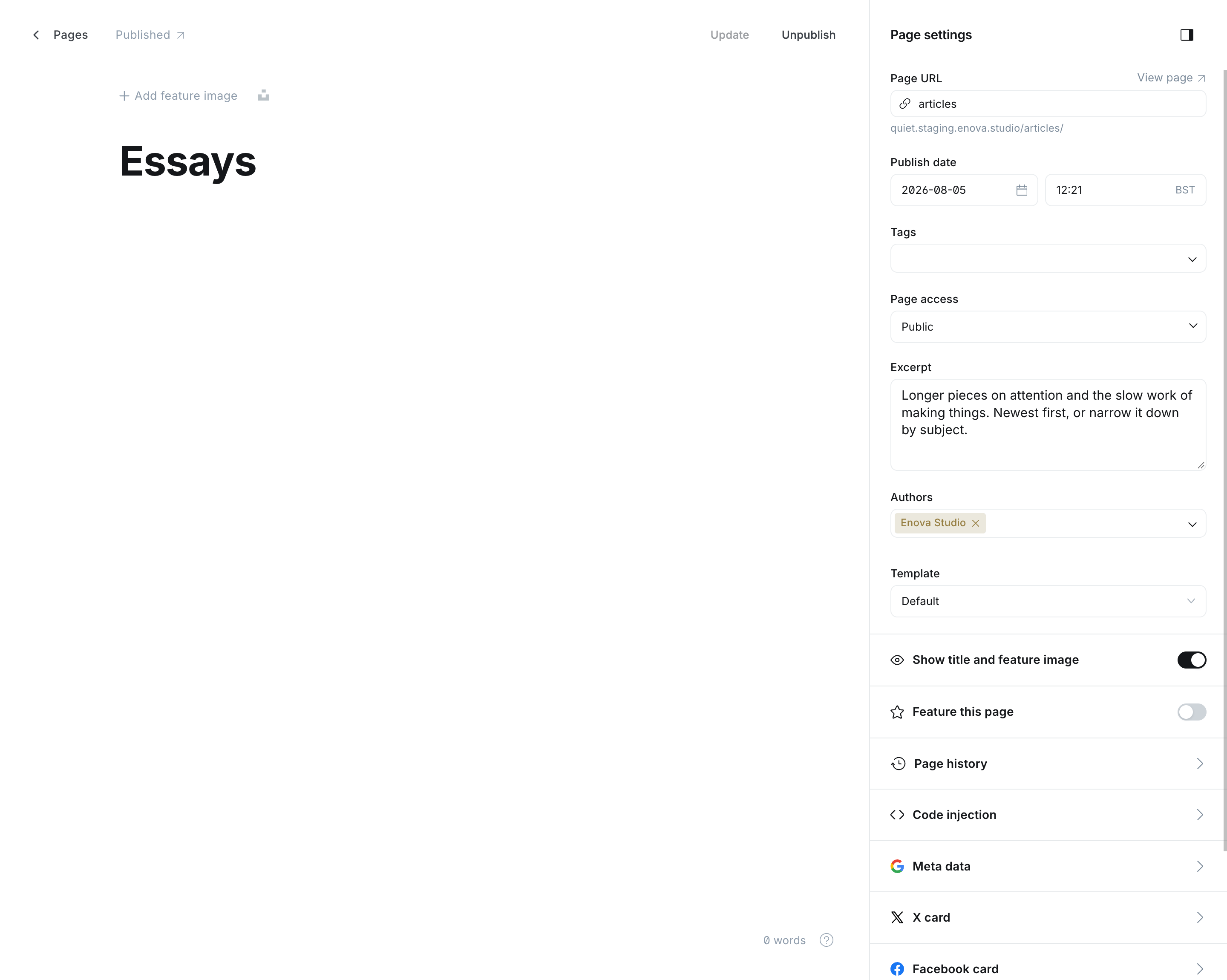
The archive
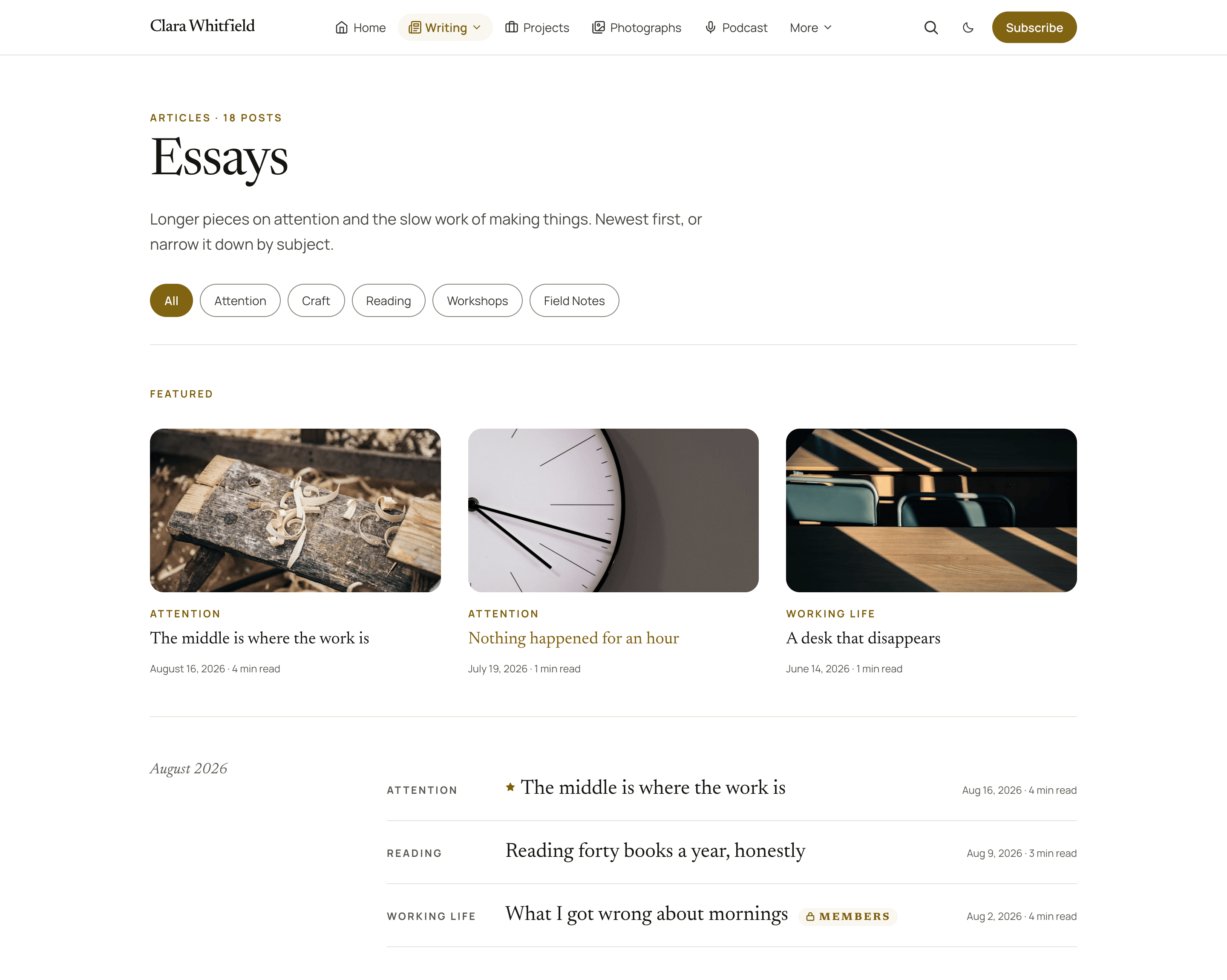
Set it up
The archive lives at /articles/, which needs the routes file and a page slugged articles. Both are covered in Installation, steps 4 and 5.
Publish a page with the slug articles. The title becomes the archive's heading.
Add an Excerpt to that page: it becomes the line under the heading. Without one, Quiet falls back to your site description.
Upload the routes file at Settings → Labs → Beta features → Upload routes file.
Add Articles to your menu at Settings → Navigation, pointing at /articles/.
Without the routes file
The archive still works, it just has no first page of its own: Ghost puts your posts on the homepage and the archive layout starts at /page/2/. That is why the routes file exists, and it is the one part of setup worth doing even on a small site.
What is on the page
- The heading and the count. "Articles · 47 posts", taken from the page's title and Ghost's own total.
- The filter row. Pills for your five most-used public tags, most used first, plus an All pill. It hides itself on a site with no public tags.
- The Featured strip. On the first page only, your three newest starred posts as picture cards: see below.
- Month sections. A month and year on the left, that month's posts on the right.
- Each row: the post's category, its title, its date, its reading time, a padlock if it is members-only, and a small star if it is featured.
- Pagination, at twelve posts a page.
Featured posts
Mark a post as Featured in the editor's settings panel (the star) and two things happen on the archive:
- It joins the Featured strip at the top of the archive's first page: a row of up to three cards, each with the post's picture, category, title, date and reading time, newest first. On a phone the row scrolls sideways, one card and the edge of the next, like the topic tiles on the homepage. Deeper pages do not repeat the strip.
- Its line in the month list gets a small star before the title. The post stays exactly where its date puts it, so a reader scanning a month still reads it in order; the star is a pointer back to the strip.
Three details are worth knowing:
- Three at most. The strip shows your three most recently published starred posts. Star a fourth and the oldest drops out of the strip (it keeps its star in the list). To change what the strip shows, star and unstar posts.
- A post with no picture still gets a card, with a plain block where the picture would be, so the row stays level.
- No starred posts, no strip. The heading and the row appear only when there is something to show. Podcast episodes and films are never in it, even when starred: they have their own homes.
The strip is the article archive's own. Tag pages and author pages show the star on the list line only. The homepage's Latest writing band has its own way of using the star: see Latest writing.
Tag pages and author pages
Both list posts the same way as the archive: month by month, one line each, a star on a featured line. Two small differences:
- A tag page shows no category on its lines. Every post there already shares the tag named in the heading, so the label would only repeat it.
- An author page opens with the author's picture, name, bio, location and post count, then a row of icons for every account on their staff profile (X, Facebook, LinkedIn, Bluesky, Threads, Mastodon, TikTok, YouTube, Instagram and their website), then goes straight into the months. It no longer has a picture grid or a signup panel of its own; the footer's form is the signup route, as on the archive.
Twelve posts a page, fixed
The archive's page size is set by the theme and is not a setting in Ghost Admin. Home latest count in Homepage settings changes the homepage band, not this page.
The filter row is automatic
There is nothing to curate. Quiet asks Ghost for your five most-used public tags and shows them in that order, so the row follows what you actually write about. Clicking a pill goes to Ghost's own tag page, which lists that tag's posts month by month, exactly like the archive.
To send readers somewhere richer than a tag page, build the topic tiles band on your homepage instead: the tiles use each tag's own picture and description.
What is not in the archive
Podcast episodes and films. Both are posts, but the routes file keeps them in their own collections, so /articles/ lists your writing only. Their homes are /podcast/ and /videos/.
Your feeds
Installing the routes file moves your feed. Worth knowing exactly where things end up:
| Feed | Address | Notes |
|---|---|---|
| Your writing | /articles/rss/ | This is your main feed once the routes file is installed, and the one Quiet's footer icon links to |
| Films | /videos/rss/ | On, and useful if you want a feed of films |
| Episodes | /podcast/rss/ | Deliberately off. A theme cannot produce a valid podcast feed (there is no place for audio files, episode numbers or duration), and a broken one in a podcast directory is worse than none |
/rss/ | gone | With the routes file installed, this address no longer exists |
Update anything pointing at /rss/
A newsletter service, an aggregator or a link in someone's bio that points at /rss/ will break. Point them at /articles/rss/. Quiet's own links follow the change automatically.
Publishing a podcast properly
Use a podcast host (Transistor, Buzzsprout, Captivate and so on) for the feed the directories consume, and embed its player in the body of your /podcast/ page. See The podcast.
The empty state
A brand new site with no posts, a tag with nothing published under it, or an author with no published work shows a short "nothing here yet" panel rather than an empty page.
Photo strip
A full-width strip of photographs on the homepage, built from image and gallery cards in one page's body, with a caption and a pause control.
Pages you can build
Quiet's five page templates, chosen from the editor's Template dropdown: a photo gallery, a newsletter landing page, a contact page, a portfolio and a team page.