

Code injection
Restyle any part of Quiet with a few lines of CSS in Ghost's code injection. What the stable handles are, how to use the theme's own colours, and what not to touch.
Quiet labels the parts of every page with stable names, so you can restyle it from Ghost Admin without editing the theme, and without your changes breaking at the next update.
You need a little CSS. If you have never written any, the copy-paste rules on the snippets page are a good place to start.
Custom fonts
Pick any font and copy the code. Nothing to edit.
Hook reference
Every handle Quiet ships, in lookup tables.
Common snippets
Ready-made CSS for the things people ask for most.
Where to paste it
Go to Settings → Code injection.
Put CSS in Site header, wrapped in a <style> tag.
Save, then reload your site with Cmd/Ctrl + Shift + R.
<style>
  [data-region="masthead"] [data-part="logo"] { height: 44px; }
</style>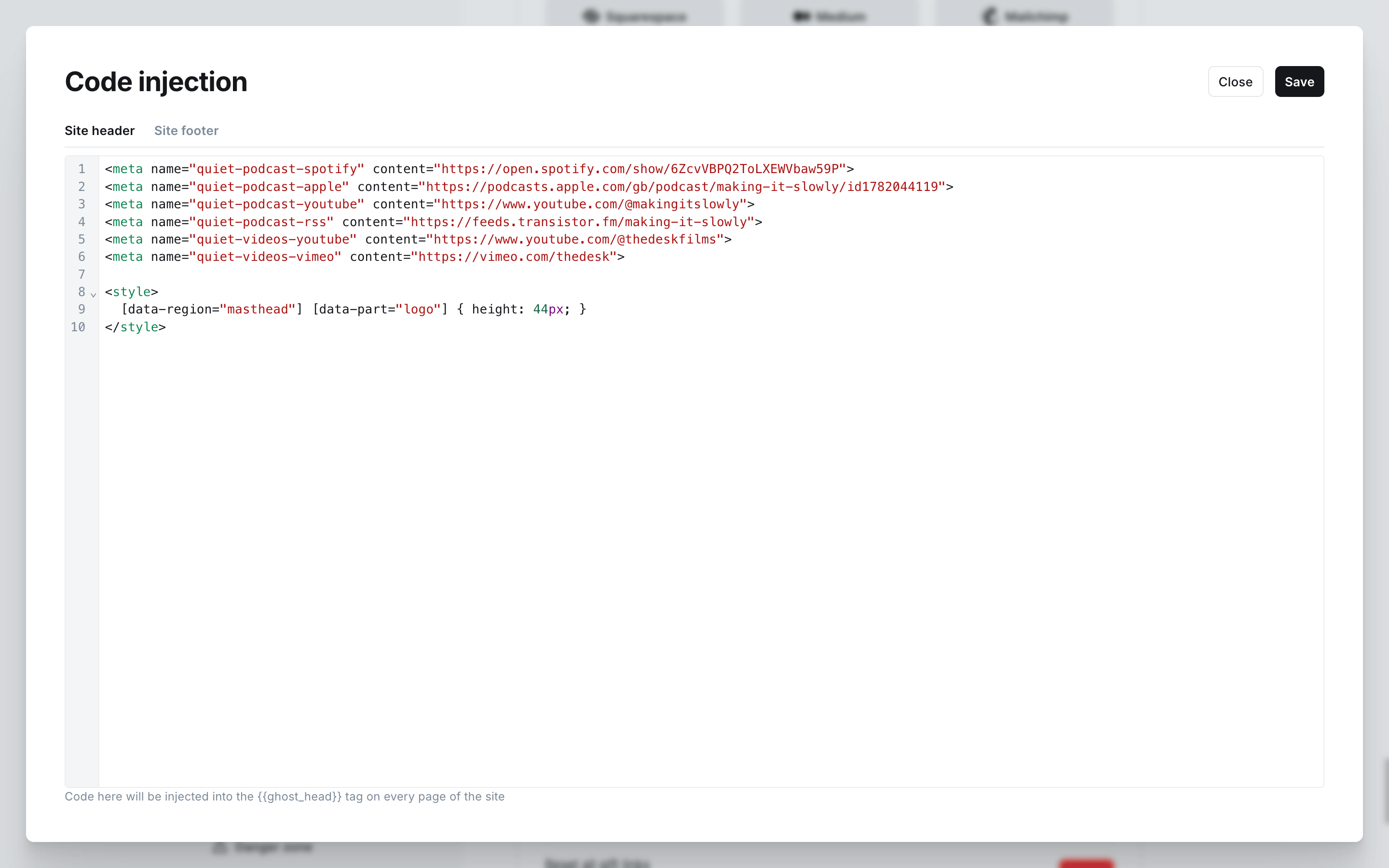
Site header is for CSS, Site footer is for blocks of HTML
A <style> tag belongs in Site header. A <div> does not: pasted there it lands inside the page's head and breaks the rest of the document. The two features that ask for a <div> (custom podcast and video links) say so explicitly, and they belong in Site footer.
The naming convention
Four attributes, and you can usually guess a handle rather than look it up.
| Attribute | Means | How many per page | Examples |
|---|---|---|---|
data-region | A large area | About one each | site-header, post-body, home-section, site-footer |
data-component | A repeating unit | Many | post-card, pagination, newsletter-panel, subscribe-form |
data-variant | A flavour of the unit it sits on | Follows its host | grid, list, row, intro, prev, next |
data-part | A piece inside | Many | title, kicker, excerpt, meta, image, logo |
They compose the way you would expect, from the outside in:
[data-region="post-feed"] [data-component="post-card"][data-variant="grid"] [data-part="title"] { … }Using the theme's own colours
Quiet's colours are variables, so a rule that uses them keeps working when you change your accent colour or the reader switches to dark mode.
| Variable | What it is |
|---|---|
--color-accent | Your accent colour, as a background |
--color-accent-ink | The accent adjusted to be readable as text |
--color-accent-soft | A very pale accent wash |
--color-on-accent | Text and icons on top of your accent colour: buttons, the current page number, selected text. Quiet picks black or white for you; you can set it yourself, see Common snippets |
--color-on-accent-muted | Quieter text on top of your accent (the small print in Ghost's signup card) |
--color-ink | The main text colour |
--color-ink-2, --color-ink-3, --color-ink-4 | Progressively quieter text |
--color-paper | The page background |
--color-surface, --color-surface-2 | Raised panels |
--color-line, --color-line-strong | Hairlines and borders |
<style>
  [data-component="hub-tile"] [data-part="title"] { color: var(--color-accent-ink); }
</style>
Targeting one colour scheme
Dark mode is a dark class on the page, so:
<style>
  /* dark mode only */
  .dark [data-region="site-footer"] { background: var(--color-surface-2); }

  /* light mode only */
  html:not(.dark) [data-region="site-footer"] { background: var(--color-paper); }
</style>
Targeting one kind of page
Ghost puts its own classes on the <body>, which is the tidiest way to scope a rule:
body.home-template  [data-region="site-header"] { … }   /* the homepage only */
body.post-template  [data-region="post-body"]   { … }   /* posts only */
body.page-template  [data-region="page-header"] { … }   /* pages only */
body.tag-template   [data-region="archive-header"] { … }
What not to target
Three things to leave alone.
- Anything a script is managing. The header menu list, the drawer, the floating player and the photo walls are measured and rebuilt as the page runs, so a rule that changes their size, overflow or position will fight the script and usually lose. Style a wrapper around them instead: the reference page marks which handles those are.
- Utility classes. Names like
mt-8,text-lgandlg:grid-cols-3come from the theme's build and are not a promise: a release can change them. Handles are the promise. - Ghost's own names. Anything starting
data-portal,data-members-ordata-ghost-belongs to Ghost, and anything startingdata-mp-,data-nav-ordata-quiet-is Quiet's own machinery. Select them if it helps, but do not remove or rename them.
When a rule does not apply
- Reload properly.
Cmd/Ctrl + Shift + R. Ghost injects your CSS into every page, but your browser may still be holding the old one. - Check the handle exists on that page. Most handles only appear on the page that has that thing on it.
- Add specificity before reaching for
!important. A longer selector ([data-region="post-body"] [data-part="title"]) usually wins on its own.!importantis fine when nothing else works, and it is the honest tool for overriding a utility class. - Test in both colour schemes. A colour that reads beautifully in light mode can disappear in dark mode. Using the variables above avoids most of it.
These handles are a promise
Every handle in the reference is a documented, stable name. Renaming or removing one counts as a breaking change and is called out in the release notes, so a rule you write today keeps working through theme updates.
Publication language
Quiet ships in fourteen languages and is fully translatable. Set your publication language and every word the theme adds, and every date, follows.
Custom fonts
Pick any font from Bunny Fonts or Google Fonts, copy the code the page builds for you, and paste it into Ghost. Nothing to edit.